
爱快路由--跨三层识别AP
一、 实验目标
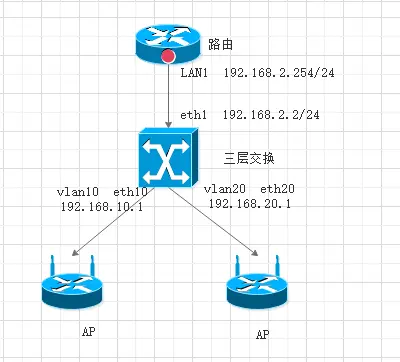
AP与路由之间间隔三层交换机。由三层下发对应vlan的dhcp,实现AC跨三层管理AP的功能
二、 拓扑图
三、 交换机配置
进入配置模式
IK-J6052>enable
IK-J6052#configure terminal
配置vlan1的ip地址
IK-J6052(config)# interface vlan 1 (进入vlan1)
IK-J6052(config-if-vlan1)#ip add 192.168.2.2 255.255.255.0 override(覆盖vlan1的ip地址为192.168.2.2)
IK-J6052(config-if-vlan1)#exit
创建vlan10和20
IK-J6052(config)# vlan 10
IK-J6052(config-vlan-10)#exit
IK-J6052(config)# vlan 20
IK-J6052(config-vlan-20)#exit
配置vlan10的ip地址
IK-J6052(config)# interface vlan 10
IK-J6052(config-if-vlanInterface-10)#ip add 192.168.10.1 255.255.255.0
IK-J6052(config-if-vlanInterface-10)#exit
配置vlan20的ip地址
IK-J6052(config)# interface vlan 20
IK-J6052(config-if-vlanInterface-20)#ip add 192.168.20.1 255.255.255.0
IK-J6052(config-if-vlanInterface-20)#exit
配置对应网口
IK-J6052(config)# interface eth 0/0/10 (进入接口10)
IK-J6052(config-if-ethernet-0/0/10)# switchport link-type access
(将10口定义为access口)
IK-J6052(config-if-ethernet-0/0/10)#switchport pvid 10
(接口的pvid为10)
IK-J6052(config-if-ethernet-0/0/10)#exit
(退出接口10)
IK-J6052(config)# interface ethernet 0/0/20 (进入接口20)
IK-J6052(config-if-ethernet-0/0/20)# switchport link-type access
(将20口定义为access口)
IK-J6052(config-if-ethernet-0/0/20)#switchport pvid 20
(接口的pvid为20)
IK-J6052(config-if-ethernet-0/0/20)#exit(退出接口20)
DHCP服务设置
IK-J6052(config)# dhcp-relay (开启dhcp使能)
IK-J6052(config)#dhcp-server 10 192.168.10.1(创建dhcp服务器10)
IK-J6052(config)#dhcp-server 20 192.168.20.1(创建dhcp服务器20)
配置对应vlan引用dhcp服务器
IK-J6052(config)#int vlan 10
IK-J6052(config-if-vlanInterface-10)#dhcp-server 10
IK-J6052(config-if-vlanInterface-10)#exit
IK-J6052(config)#int vlan 20
IK-J6052(config-if-vlanInterface-20)#dhcp-server 20IK-J6052(config-if-vlanInterface-20)#exit
配置dhcp服务器的地址池
IK-J6052(config)#dhcp ip-pool 10 (创建地址池10)
IK-J6052(config-ip-pool-10)# gateway 192.168.10.1 255.255.255.0(配置与这个地址池内地址对应的网关)
IK-J6052(config-ip-pool-10)# section 0 192.168.10.2 192.168.10.100
(配置地址池的范围)
IK-J6052(config-ip-pool-10)#router 192.168.10.1(配置dhcp分配的网关)
IK-J6052(config-ip-pool-10)#dns-list primary-ip 114.114.114.114(配置主dns)
IK-J6052(config-ip-pool-10)#dns-list second-ip 8.8.8.8(配置备dns)
IK-J6052(config-ip-pool-10)#option 43 hex 01 04 c0 a8 02 fe(配置option43 hex后面为十六进制的地址,其中01 04是固定的。后面四位是将10进制的A、B、C三类地址 进行转换得来)
IK-J6052(config-ip-pool-10)#exit(退出)
同理配置第二个20段的dhcp地址池
IK-J6052(config)#dhcp ip-pool 20
IK-J6052(config-ip-pool-20)# gateway 192.168.20.1 255.255.255.0
IK-J6052(config-ip-pool-20)# section 0 192.168.20.2 192.168.20.100
IK-J6052(config-ip-pool-20)#router 192.168.20.1
IK-J6052(config-ip-pool-20)#dns-list primary-ip 114.114.114.114
IK-J6052(config-ip-pool-20)#dns-list second-ip 8.8.8.8
IK-J6052(config-ip-pool-20)#option 43 hex 01 04 c0 a8 02 fe
IK-J6052(config-ip-pool-20)#exit
配置静态路由表
IK-J6052(config)#ip route 0.0.0.0 0.0.0.0 192.168.2.254
IK-J6052#copy running-config startup-config(保存配置)
四、 路由器设置
1. 正常配置好路由的内外网
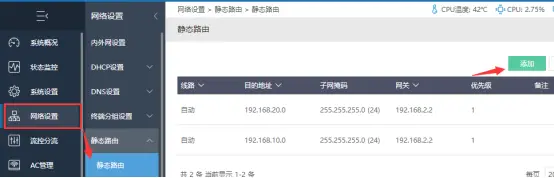
2. 添加好对应网段的路由表
3. 打开AC智能控制
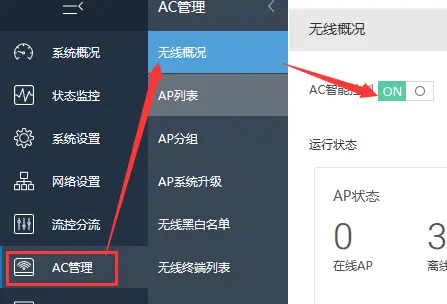
然后断电重启一次AP,静静等待1-5分钟左右,AP就会直接上线了